The global magazine and marketplace for classic car enthusiasts, by enthusiasts.


Filter
Make a choice:
- Cars
-
Make >>
-
Year >>
-
- Bikes
-
Make >>
-
Year >>
-
-
Location >>
- Parts & more
-
Make of car >>
-
Manufacturer >>
-
Category >>
-
Countries


How-to add a video to your advertisements
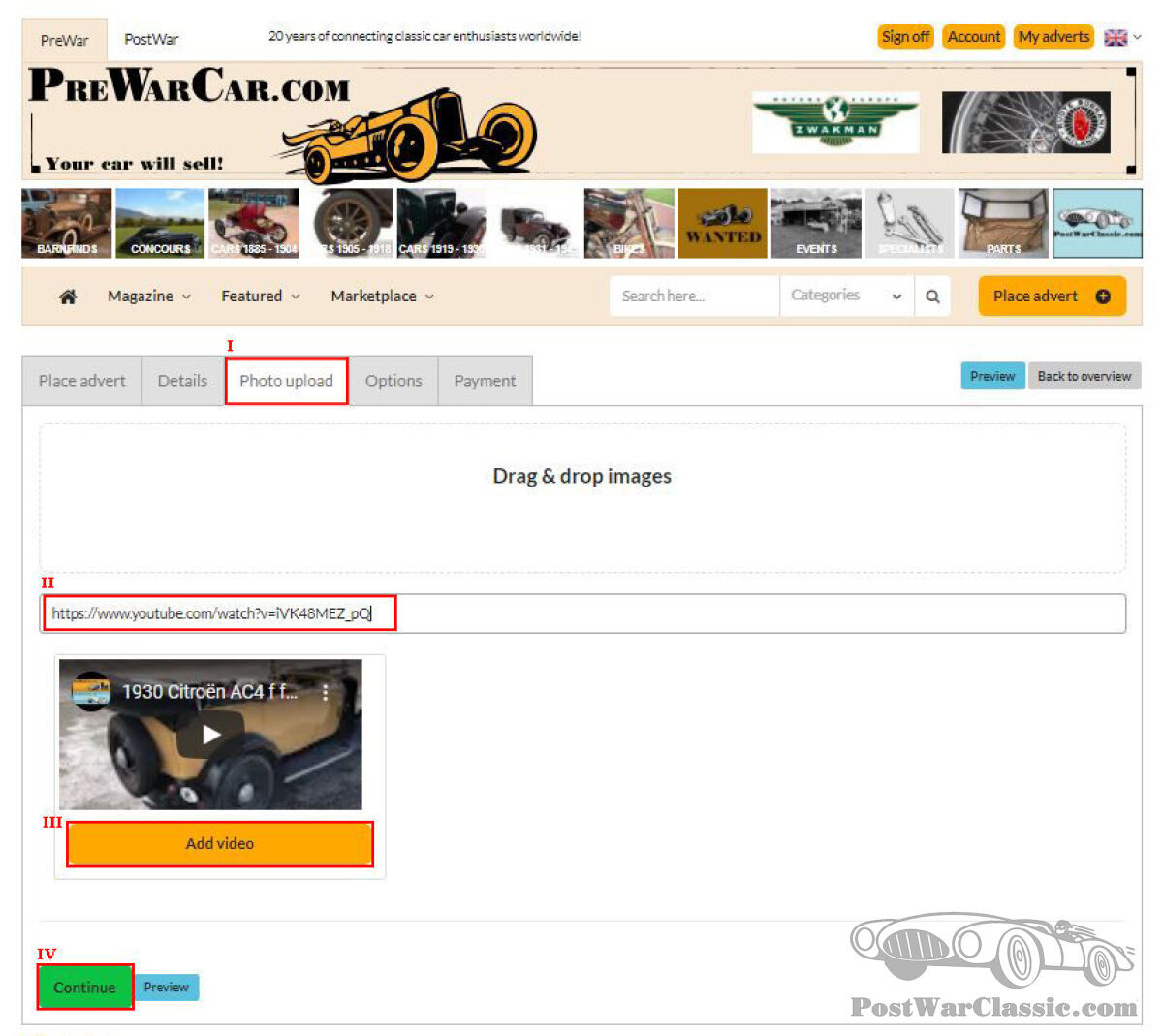

A video is a great way to give a complete view on the car, bike or part you would like to sell, as adding an animated presentation of your car gives a fuller picture and will help you to successfully sell. In the advertisements you place on PostWarClassic.com & PreWarCar.com, it is possible to add a YouTube video. Below is a step-by-step guide on how to add a video to your advertisement.
To start, you need to log-in and create a new advert like any other normal advertisement.
The video can be added at the ‘Photo upload’ tab (I on the attatched picture). Here, you can put your YouTube URL, video ID, or search query.
After you have added the link to this field (II), a popup of the video will be shown (sometimes you will need to press the spacebar before you get to see the example). Here click on the yellow button ‘Add video’ (III).
The video is uploaded!
You can add more videos and/ or photos before clicking on ‘Continue’ (IV).
At the checkout page the fee for the YouTube video will be automatically added, and after payment, the video will automatically appear in the advertisement.
Frequently asked questions:
1. I don’t have a YouTube account; how can I add the video?
If you don’t have a YouTube account, we are happy to help. Please send us an email with the video and the advert that you would like to add it to. This can be sent to office@postwarclassic.com. If the video is too large for a normal email, please use We-Transfer.
2. Can I add more than one video?
Yes, this is possible. Just follow the same steps again.
3. I don’t know how to make a video myself, can you help?
Yes, this is possible. We partnered up with a video specialist who can make a video of your car with several specialized cameras. For more information, please send us an email at office@postwarclassic.com.
4. Can I add videos to an existing advertisement?
Yes, this can easily be done. Click on the title of the advertisement in the overview page, go to the tab ‘Photo upload’ and follow the steps.
5. How do I add the position of the video compared with the other photos.
You can also change the position of the video on the upper right side of the thumbnail (a 4-way arrow), click on it and swipe to another position.
If you have other questions, feel free to send us an email to office@postwarclassic.com.
Published:
Monday July 24th, 2023
Facebook
LinkedIn
Twitter
WhatsApp
Email
Copy